
Publish High-Converting Google Business Profile Posts on Search and Maps
Core Types of Google Business Profile Posts

To publish high-converting Google Business Profile posts, select the specific post format that matches your immediate goal, hook readers within the first sentence, and attach a clear call-to-action button linking directly to a relevant landing page. Most businesses treat their listing like an old yellow pages ad by setting the address and letting it collect dust. That is a massive missed opportunity. Google provides dedicated post formats built to answer searcher questions and drive immediate local action.
Matching your business goal with the proper format makes all the difference. When you pick the right category, Google serves up built-in features like countdown timers, coupon code fields, and customizable action buttons that turn casual scrollers into actual paying clients.
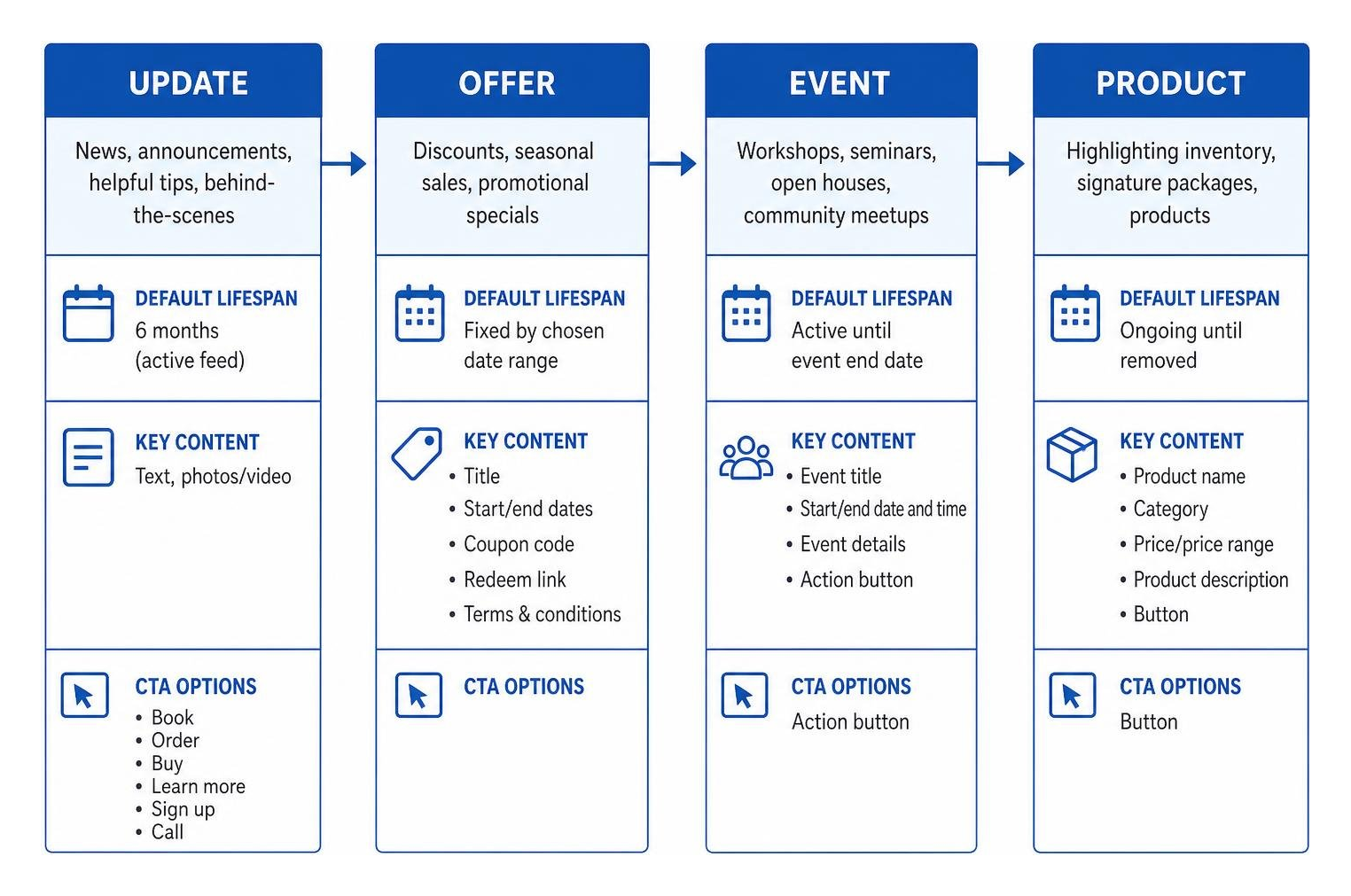
| Post Type | Ideal Use Case | Default Lifespan | Key Features & CTA Options |
|---|---|---|---|
| Update | News, announcements, helpful tips, behind-the-scenes | 6 months (active feed) | Text, photos/video, buttons (Book, Order, Buy, Learn more, Sign up, Call) |
| Offer | Discounts, seasonal sales, promotional specials | Fixed by chosen date range | Title, start/end dates, coupon code, redeem link, terms & conditions |
| Event | Workshops, seminars, open houses, community meetups | Active until event end date | Event title, start/end date and time, event details, action button |
| Product | Highlighting inventory, signature packages, products | Ongoing until removed | Product name, category, price/price range, product description, button |
Update Posts
Update posts (often referred to as "What's New") are the everyday workhorses of your listing. They are built for general operational news, new service announcements, client success stories, or quick educational tips.
If you are a dog trainer who just opened three spots in an upcoming reactive rover workshop, an update post puts that news front and center. Use this space to showcase your personality and keep your brand voice authentic. You have up to 1,500 characters, but getting straight to the point in the first two sentences delivers the strongest results.
Offer Posts
When you want immediate sales, offer posts do the heavy lifting. Unlike standard updates, offer posts require a title along with strict start and end dates.
Google lets you add specific promotional details that reduce customer friction:
- A clear headline summarizing the deal (e.g., "Save 20% on First-Time Puppy Boarding")
- Start and end dates that trigger automated urgency
- An optional coupon code for tracking redemptions
- A direct link to your checkout or booking page
- Terms and conditions so nobody is surprised by blackout dates
These posts stand out distinctively on mobile devices and Google Maps, making them fantastic for seasonal pushes or filling slow booking windows.
Event Posts
Hosting a community pack walk, a pet first-aid workshop, or an open house? Event posts are designed specifically for time-sensitive gatherings.
You must define the event title, start date, and end date, with optional start and end times. Google keeps these posts prominently visible on your profile until the event concludes, ensuring searchers see accurate scheduling information without digging through your website. Always pair an event post with an action button like "Sign up" or "Book" linking straight to your event registration page.
Product Posts
Product posts allow you to curate a mini digital storefront right on your business profile. While service-based businesses often overlook this feature, it works exceptionally well for showcasing fixed-price packages, signature services, or physical retail products.
You can categorize items, display an exact price or price range, write a targeted product overview, and attach a direct "Buy" or "Order online" button. Each product card stays attached to your profile, giving prospective buyers immediate insight into your pricing and core offerings before they even land on your site.
Step-by-Step Guide to Creating and Managing Posts
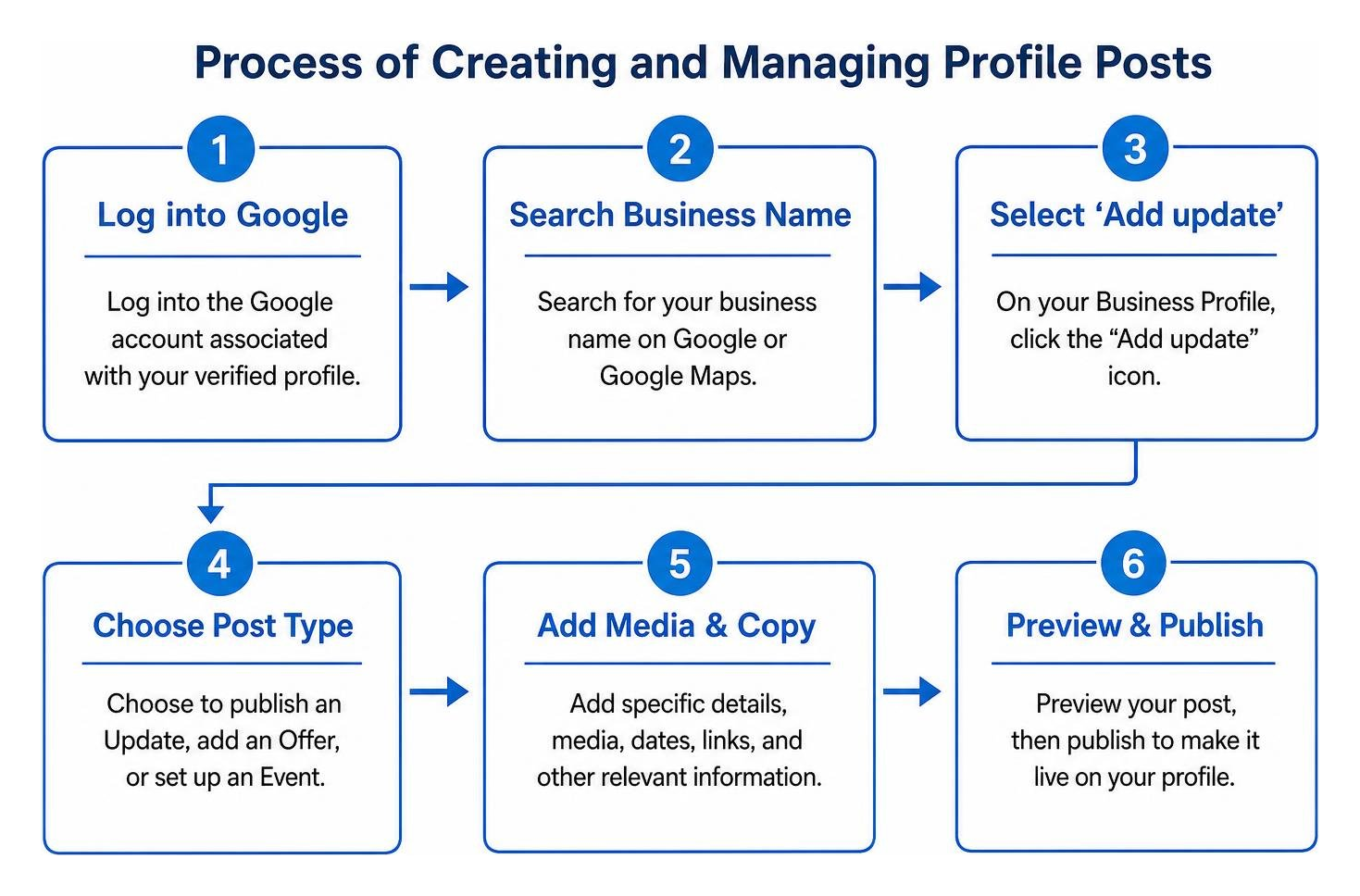
Publishing updates on Google is straightforward once you know where the controls live. You can manage everything directly from Google Search or Google Maps while logged into the Google account associated with your verified profile.
To review Google's official baseline requirements, consult the official guide on how to Create & manage posts on your Business Profile - Google Business Profile Help.
Creating, Editing, and Deleting Posts
Managing your content requires only a few clicks inside the search dashboard:
- Access your profile: Search for your business name on Google while logged into your management account. You will see your Merchant Experience panel directly above the organic search results.
- Select your post type: Click on the Add update icon. Choose whether you are publishing an Update, adding an Offer, or setting up an Event.
- Fill in the core details: Upload your media, write your descriptive text, and configure your dates if you are running an offer or event.
- Attach a call-to-action: Choose the appropriate button (such as "Book", "Sign up", or "Learn more") and paste your destination URL.
- Preview and publish: Review how your post appears to ensure text formatting and images look clean, then click Post.
Editing or removing old content is just as simple. Head to the updates section on your dashboard, locate the specific post, click the three-dot menu icon, and select Edit to modify details or Delete to remove the post entirely.
Your post will display an active status once published:
- Live: The post is verified and actively visible to the public across Google Search and Maps.
- Pending: The post is currently processing or undergoing system review before appearing publicly.
- Not Approved: The post violated an editorial or content policy and remains hidden from searchers.
Content Policies and Avoiding Post Rejections
Nothing is more frustrating than drafting a great announcement only to see it flagged as "Not Approved." Google uses automated filters to review posts, and these bots can be aggressive.
To keep your posts live and compliant:
- Never include phone numbers in post copy: Google provides dedicated "Call now" buttons for direct calls. Adding phone numbers inside the description text is the single most common reason posts get rejected.
- Avoid spam-like formatting: Excessive punctuation (e.g., "FREE SALE NOW!!!!"), ALL CAPS sentences, and weird character strings trigger spam filters.
- Link only to trusted, secure destinations: Your links must point to safe, functional HTTPS websites. Destination URLs with suspicious redirects, broken pages, or untrusted domains result in immediate post rejections.
- Steer clear of restricted goods: Google strictly forbids posts promoting regulated industries, adult content, alcohol, tobacco, weapons, and unauthorized pharmaceuticals.
- Keep imagery family-friendly: Upload original photos and avoid graphics with excessive text overlays, logos plastered across the center, or low-resolution stock shots.
Optimization Strategies for Maximum Visibility and CTR
Publishing a post is only half the battle. You want prospective clients to actually click your links and take action. Strategic optimization transforms your updates from digital wallpaper into reliable traffic drivers.
For developers and technical marketers seeking automated workflows, you can explore the technical framework through Create Posts on Google | Google Business Profile APIs.
Best Practices for Writing Google Business Profile Posts
Searchers scanning your profile have short attention spans. They are comparing you against three other local providers on Maps, which means your copy needs to deliver immediate value.
- Hook readers in the first sentence: While Google allows up to 1,500 characters, search results often truncate your post after the first 80 to 100 characters. Put the primary benefit, offer, or news in that first line.
- Weave local search terms naturally: Include specific services and local identifiers organically (for example, "our six-week basic obedience course in North Austin"). Never stuff keywords; write for human readers first.
- Pair every post with one clear next step: Do not confuse prospects with multiple options. If you are talking about puppy socialization classes, link directly to the puppy socialization booking page, never your generic homepage.
- Add UTM parameters to links: Google does not provide deep native conversion analytics for individual posts. Add custom campaign tracking to your button URLs (such as
?utm_source=gbp&utm_medium=post&utm_campaign=summer_special) so you can track exact bookings and revenue inside Google Analytics.
Image Specifications and Media Guidelines
The visual creative you select determines whether a searcher stops scrolling. Using awkward dimensions results in weird auto-crops that cut off heads, text, and product details.
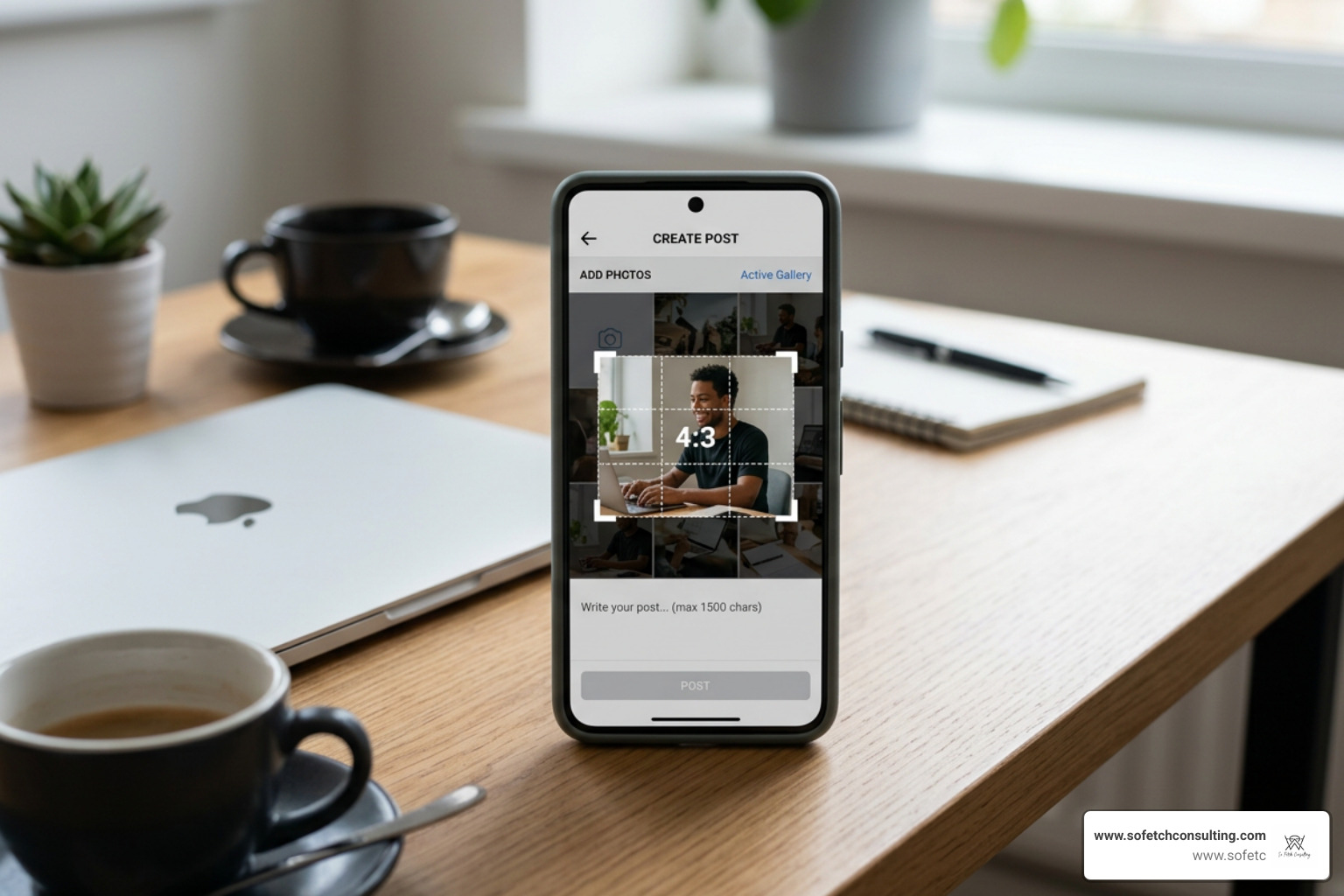
- Optimal dimensions: Use a resolution of 1200 x 900 pixels (a standard 4:3 aspect ratio). This prevents Google from awkwardly cropping your subject on mobile screens.
- Accepted image formats: Standard JPG or PNG formats work best, with file sizes kept between 10 KB and 5 MB.
- Video specifications: You can upload short video clips up to 30 seconds in length. Videos must have a minimum resolution of 720p and a file size under 75 MB.
- Framing rule: Keep your primary subject centered. Google's display interfaces vary across desktop browsers, mobile apps, and Maps cards. Centering your visual subject guarantees it remains visible regardless of device formatting.
How to Schedule Google Business Profile Posts
Consistency beats random bursts of activity every time. Aim to publish a fresh update roughly once per week to keep your profile active and engaging.
Google's native dashboard includes basic scheduling tools for select business types, allowing you to set future publish dates or establish recurring cadences. For businesses managing content calendars across multiple marketing channels, third-party scheduling platforms connect via Google's API to automate post publishing alongside your broader social and search strategies.
Frequently Asked Questions About Profile Posts
Do profile updates directly improve local search rankings?
No, profile updates are not a direct Google ranking factor. You cannot post five times in a week and expect your listing to magically jump from position four to position one in the local 3-pack.
However, posts generate strong indirect local SEO benefits. Active posts increase user interaction, click-through rates, and customer engagement signals. They also introduce fresh, locally relevant service keywords to your listing. Over time, high customer engagement combined with positive profile interactions helps strengthen your local search authority.
How long do updates stay visible before being archived?
Standard update posts remain prominently featured in your profile's active feed for six months. After six months, Google automatically archives them, though searchers can still browse past updates in your historical feed.
Offer and event posts follow custom lifespans based entirely on the start and end dates you configure during creation. Once an event finishes or an offer expires, Google removes it from the primary display area automatically.
Why was my post rejected by Google?
Google relies on automated systems to review content, and post rejections usually come down to a few standard triggers:
- Including a phone number inside the description text rather than using the official "Call" action button
- Using aggressive promotional formatting, such as all-caps text, excessive exclamation points, or spammy trigger words
- Adding links that redirect to unverified, unsecure, or non-functional landing pages
- Uploading low-resolution images, heavily watermarked graphics, or images containing excessive text overlays
- Mentioning restricted or regulated products that violate local commerce policies
Drive Measurable Growth with Strategic Profile Posting
Your business profile on Google is often the very first interaction a local client has with your brand. Leaving it static while competitors regularly share new updates, active promotions, and seasonal events is leaving money on the table.
Treating your profile as an active conversion hub helps you capture high-intent searchers right when they are ready to make a decision. Consistent updates showcase your active expertise, establish neighborhood credibility, and guide prospects directly into your booking system.
At So Fetch Consulting, we help pet businesses, local non-profits, and service providers turn their online presence into an engine for sustainable growth. We build integrated systems combining SEO, conversion-focused websites, and structured content roadmaps through our proprietary The S3 System™.
When you are ready to take your local marketing seriously, explore our framework to scale your local reach and drive real customer action.